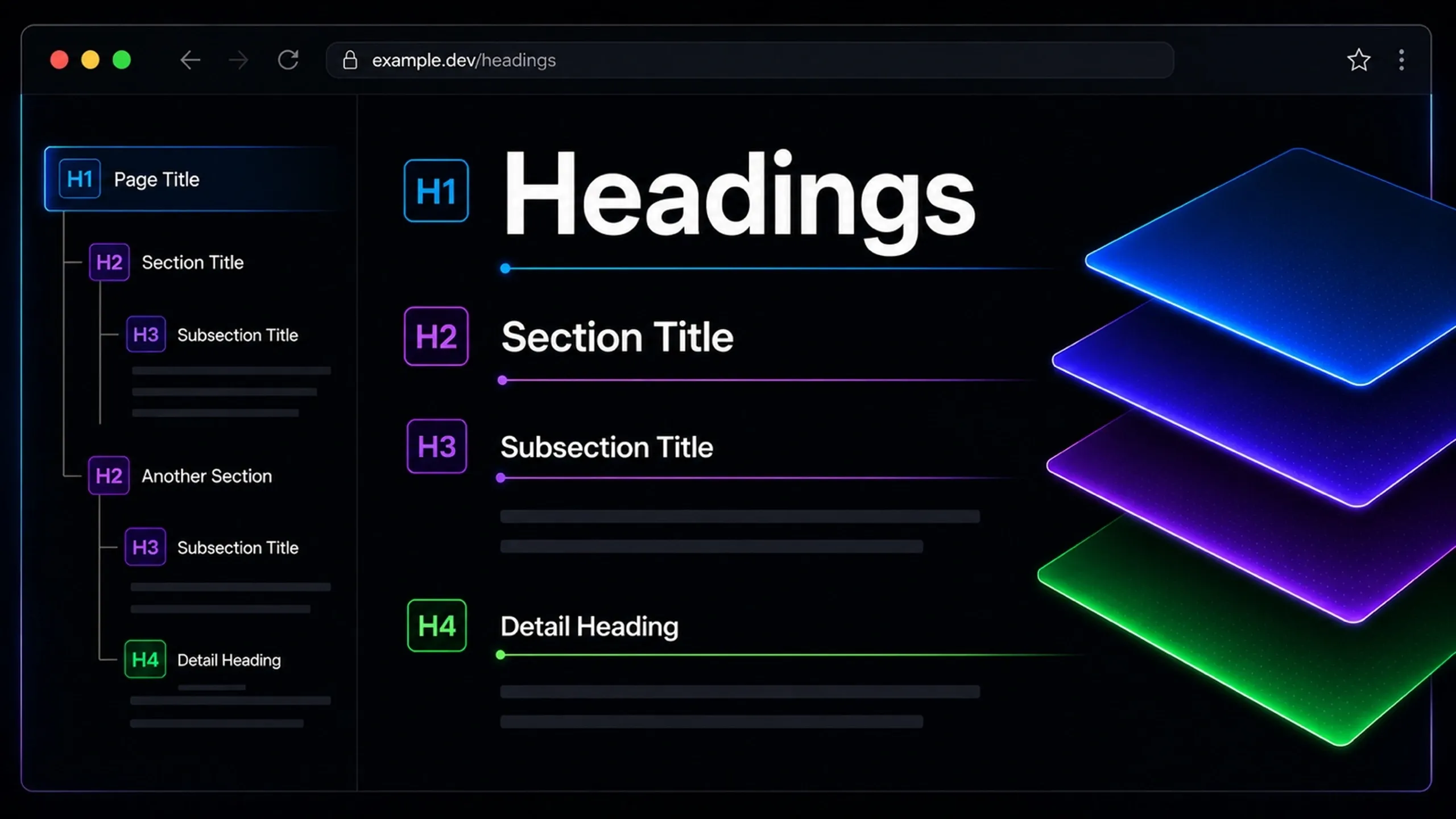
Headings
Structure Makes Content Readable.
Headings are the structural labels that organize a page into clear sections.
They help readers understand what a page is about, where each idea begins, and how different sections relate to one another. They also help search engines, assistive technologies, editors, designers, and developers interpret the structure of a page more reliably.
A good heading structure does not exist only for SEO. It improves readability, accessibility, content quality, and long-term maintainability.
Headings are not decorative text. They are the visible structure of a page.
What Are Headings?
Headings are text elements used to introduce sections of content.
On a webpage, headings are usually marked up with HTML heading tags from H1 to H6. These tags create a hierarchy that describes the structure of the page.
The most common heading levels are:
Heading Level | Common Role |
|---|---|
H1 | Main page title |
H2 | Main sections |
H3 | Subsections inside H2 sections |
H4 | Smaller subsections inside H3 sections |
H5 | Rarely needed |
H6 | Rarely needed |
In most normal pages and articles, H1, H2, and H3 are enough. H4 may be useful for complex guides, documentation, comparison pages, or long technical resources.
Why Headings Matter
Headings matter because they make content easier to understand.
Without headings, a page becomes a long block of text. Readers have to work harder to scan, compare, and decide whether the content answers their question. Search engines also have fewer structural signals to understand the main topics and supporting details on the page.
Headings support several important functions at the same time.
1. Readability
Most people do not read webpages from top to bottom at first. They scan.
Clear headings help readers identify whether the page is relevant, find the section they need, and understand the flow of the content before reading in detail.
A strong heading structure gives readers a quick map of the page.
2. SEO
Headings help search engines understand the main topics and subtopics of a page.
They are not magic ranking factors by themselves, but they provide useful context. A good heading structure can support better crawling, indexing, relevance, featured snippets, AI search summaries, and answer extraction because the content is easier to interpret.
The value comes from clarity, not keyword stuffing.
3. Accessibility
Headings are important for screen reader users and keyboard navigation.
Many assistive technologies allow users to jump between headings to understand a page structure quickly. If headings are skipped, misused, or applied only for visual styling, the page becomes harder to navigate.
Good headings make content more inclusive.
4. Content Architecture
Headings also support content planning.
They force the writer to decide what each section is about, how ideas are grouped, and whether the page has a logical flow. Weak headings often reveal weak content architecture.
If the headings are unclear, repetitive, or out of order, the article probably needs better organization.
Heading Hierarchy
Heading hierarchy describes the order and relationship between heading levels.
The H1 should describe the main topic of the page. H2s should describe the main sections. H3s should support the H2 section they sit under.
A basic article structure may look like this:
This structure is easy to understand because each heading level has a clear role.
The page is not just styled visually. It is organized semantically.
H1 Headings
The H1 is the main heading of the page.
It should clearly describe the primary topic. On most pages, there should be one visible H1 because the page should have one main subject.
The H1 does not need to be identical to the meta title, but it should be closely aligned.
For example:
Page Type | H1 Example |
|---|---|
Blog post | Headings |
Service page | SEO Consulting Services |
Product page | Wireless Noise-Cancelling Headphones |
Category page | Technical SEO Articles |
Guide page | How to Build a Measurement Strategy |
A good H1 is clear, specific, and easy to understand without needing extra context.
H2 Headings
H2 headings introduce the main sections of the page.
They should break the content into meaningful parts. Each H2 should represent a major idea, question, step, category, or decision point.
For an article about headings, useful H2s may include:
H2 Heading | Purpose |
|---|---|
What Are Headings? | Defines the topic |
Why Headings Matter | Explains the value |
Heading Hierarchy | Explains structure |
Heading Best Practices | Gives practical guidance |
Common Mistakes | Warns against poor usage |
FAQs | Answers common questions |
Good H2s help readers understand the whole page just by scanning the section titles.
H3 Headings
H3 headings support an H2 section.
They should not introduce unrelated ideas. Instead, they should divide one main section into smaller parts.
For example, under an H2 called “Why Headings Matter,” H3s could include:
H3 Heading | Relationship to H2 |
|---|---|
Readability | One reason headings matter |
SEO | One reason headings matter |
Accessibility | One reason headings matter |
Content Architecture | One reason headings matter |
This keeps the structure logical.
If an H3 feels like a completely new topic, it may need to become an H2 instead.
Heading Best Practices
Strong headings are simple, descriptive, and structured. They should help both people and systems understand the content without guessing.
Use One Clear H1
Use the H1 for the main topic of the page.
Avoid using multiple H1s for unrelated page sections, design elements, banners, or repeated layout components. Even when HTML allows flexibility, a single clear H1 is usually easier to manage, audit, and understand.
The H1 should answer one basic question: what is this page about?
Keep Headings Descriptive
A heading should describe the section that follows.
Weak headings are vague:
Weak Heading | Better Heading |
|---|---|
Overview | What Are Headings? |
Details | Why Headings Matter |
Important Things | Heading Best Practices |
Problems | Common Heading Mistakes |
Descriptive headings improve scanning, SEO, accessibility, and editorial clarity.
Follow a Logical Order
Heading levels should follow a clean structure.
Do not jump from H2 to H4 just because the design looks right. If a section needs a subsection, use H3. If that subsection needs another layer, use H4.
The heading level should describe structure, not visual size.
Do Not Use Headings Only for Styling
A heading tag should not be used just to make text larger, bolder, or more prominent.
If text is not introducing a section, it probably should not be marked as a heading. Use CSS for visual styling and heading tags for structure.
This distinction matters for accessibility and semantic HTML.
Include Keywords Naturally
Headings can include relevant keywords, but they should still read naturally.
A good heading explains the section first. Keyword relevance should support clarity, not replace it.
For example:
Over-Optimized | Better |
|---|---|
SEO Headings SEO Best Practices for SEO Heading Tags | Heading Best Practices for SEO |
H1 Tag SEO H1 Heading Optimization Guide | How to Write a Clear H1 |
HTML Heading Tags SEO Ranking Factor | How Headings Support SEO |
Search engines and readers both benefit from headings that sound natural.
Match the Heading to the Content
The section content should deliver what the heading promises.
If the heading says “How to Write Better Headings,” the section should provide practical writing guidance. If it says “Heading Mistakes,” the section should identify mistakes clearly.
Misleading headings create poor reading experiences and weaken trust.
Use Headings to Improve Page Flow
Headings should create a smooth progression.
Each section should lead naturally into the next. If the headings feel disconnected, the page may need restructuring.
A strong page usually moves from definition, to importance, to structure, to practical application, to mistakes, to FAQs.
Headings and SEO
Headings support SEO by making page content easier to interpret.
Search engines use many signals to understand a page. Headings are one of the structural signals that help explain what the content covers and how topics are organized.
This does not mean adding keywords into every heading will improve rankings. That usually makes content worse.
Good SEO heading practice means:
Practice | Why It Helps |
|---|---|
Use a clear H1 | Defines the main topic |
Use descriptive H2s | Clarifies major sections |
Use H3s for supporting ideas | Builds topic depth |
Avoid keyword stuffing | Keeps content natural |
Align headings with search intent | Helps answer the right query |
Structure content for scanning | Improves user experience |
Headings are strongest when they reflect a well-planned page, not when they are forced in after the content is written.
Headings and Accessibility
Accessible headings help users understand and navigate a page.
Screen reader users often browse a page by heading. This allows them to understand the structure quickly, skip irrelevant sections, and move directly to useful content.
Poor heading structure can make this difficult.
For example, a page with random heading levels, repeated headings, or visual text marked as headings may sound confusing when read through assistive technology.
Accessible heading practice means:
Practice | Accessibility Benefit |
|---|---|
Use real heading tags | Allows assistive technology to detect structure |
Keep heading order logical | Makes navigation predictable |
Avoid empty headings | Prevents confusing output |
Avoid decorative headings | Keeps structure meaningful |
Write clear labels | Helps users understand sections quickly |
Accessibility is not separate from good content. Clear structure helps everyone.
How to Review a Page’s Headings
A heading review should check both structure and usefulness.
Start by reading only the headings from top to bottom. The page should still make sense without the body copy. If the heading outline feels confusing, repetitive, thin, or out of order, the page needs improvement.
A practical heading review should ask:
Question | What It Checks |
|---|---|
Is there one clear H1? | Main topic clarity |
Do the H2s cover the major sections? | Page structure |
Do H3s support the right H2s? | Logical hierarchy |
Are the headings descriptive? | Readability |
Do headings match the content below? | Content accuracy |
Are keywords used naturally? | SEO quality |
Is the structure accessible? | Usability and inclusion |
The best heading structures are usually easy to explain. If a page’s headings require too much justification, the structure is probably too complicated.
Final Thoughts
Headings are one of the simplest ways to improve a webpage.
They make content easier to scan, easier to understand, easier to maintain, and easier for search engines and assistive technologies to interpret.
Good headings do not need to be clever. They need to be clear, useful, and structurally honest.
A strong heading structure turns a page from a block of content into a readable, navigable, and meaningful document.